Best MCP Servers for Claude Code (2026)
A practical editorial guide to the MCP servers that actually improve Claude Code workflows, with setup order, trade-offs, and common failure patterns.

Why this matters right now
Claude Code has made terminal-first AI coding mainstream. The bottleneck is no longer “can the model write code,” but “can the agent safely and reliably access the right tools.”
That’s exactly what MCP servers solve — but most lists online are either too shallow (“top 20 MCPs!”) or too risky (no mention of permissions, scopes, blast radius). This guide is intentionally opinionated: what to install first, what to delay, and what breaks in real usage.
TL;DR verdict
If you’re setting up Claude Code from scratch, use this order:
- Filesystem (scoped)
- GitHub (scoped token)
- Fetch (docs/context)
- PostgreSQL (read-only)
- Sentry (triage)
The first three cover most coding workflows. Everything else is an optimization layer.
What “good” looks like in production
A strong Claude Code setup should satisfy all three:
- Execution: agent can read/write in approved project paths
- Observability: agent can inspect context (GitHub/Sentry/docs)
- Containment: failures can’t trigger high-blast operations by default
If you only optimize for power, you’ll get scary automation. If you only optimize for safety, you’ll get a chatbot that can’t ship.
The short list (with trade-offs)
| Server | Primary value | Setup friction | Risk profile | Editorial take |
|---|---|---|---|---|
| MCP Filesystem | Local file read/write | Low | Medium | Mandatory baseline |
| MCP GitHub | PR/issues/repo context | Medium | Medium | Best leverage per minute |
| MCP Fetch | Docs + external context | Low | Low | Great for grounding |
| MCP PostgreSQL | SQL debugging/inspection | Medium | High | Use read-only and limits |
| MCP Sentry | Error triage + stack insights | Medium | Medium | Huge for mature teams |
| MCP Redis | Runtime cache/session checks | Medium | Medium | Useful for backend-heavy stacks |
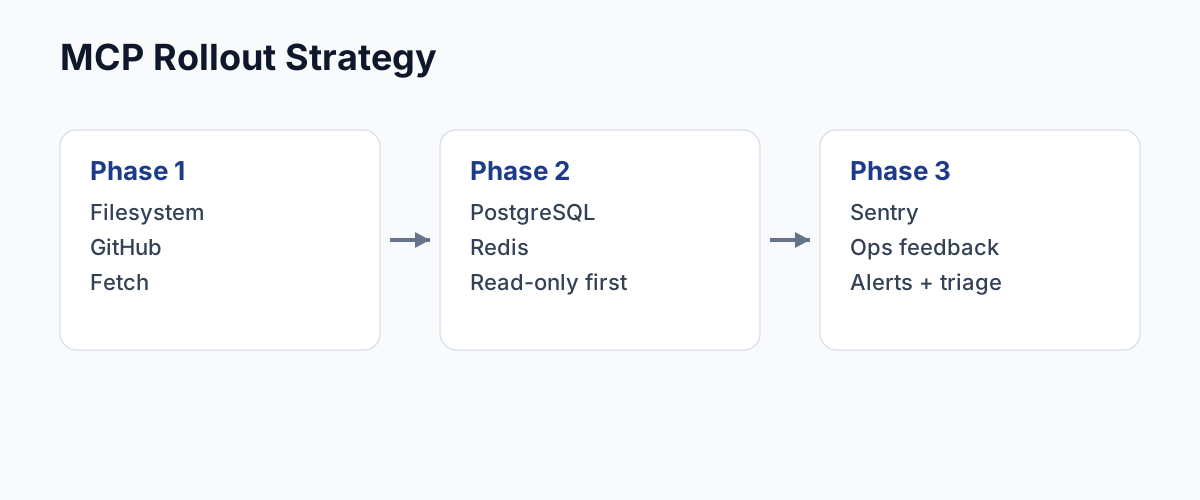
Recommended rollout (editor’s sequence)
Phase 1: Ship-ready minimum (Day 1)
- Filesystem
- GitHub
- Fetch
This gives Claude enough power to do real coding work without opening risky infrastructure surfaces.
Phase 2: Data confidence (Day 2-3)
- PostgreSQL (read-only role)
- Redis (read-first)
Use these when your prompts require “verify with data” and not just code edits.
Phase 3: Ops feedback loop
- Sentry
Once your agent starts helping with bug-fix loops, Sentry becomes the highest-ROI context source.
Real failure patterns we keep seeing
1) “Agent only chats, no real actions”
Most common root cause: tool profile accidentally set to messaging instead of coding.
2) GitHub looks connected but actions fail
Token scope mismatch (repo, org restrictions, or fine-grained token too narrow).
3) SQL server works once, then becomes flaky
No timeout/row-limit policy + heavy query patterns.
4) Filesystem “works” but file ops silently fail
Whitelist path not matching current working directory.
Setup checklist (copy this into your ops notes)
- Confirm tool profile is
coding - Add Filesystem with explicit allowed paths
- Add GitHub with least-privilege token
- Validate one read action and one write action
- Add query limits for DB tools
- Keep a rollback path (disable newest MCP first)
Safety rules that actually matter
- Read-first policy for data systems
- Scoped credentials per tool
- One-server-at-a-time rollout
- Prompt-level guardrails (e.g., “never run destructive SQL without confirmation”)
Editor’s recommendation
Don’t install every MCP server you can find. That’s not maturity — that’s entropy.
For most teams, Filesystem + GitHub + Fetch is the sweet spot to start shipping faster. Add database and observability MCPs only when your workflow proves the need.
The winning setup is not the most powerful one; it’s the one that keeps shipping velocity high while keeping failure blast radius low.